开发教程
使用手册
广告管理
模板设置
数据库管理
插件管理
分销管理
积分管理
小程序直播
第三方账号注册流程
网站模块
商品模块
订单管理模块
供应商模块
数据模块
微商城模块
小程序&APP模块
常见问题
支付对接
API接口
购物车相关接口
开发手册
支付退款接口
视频教程
FB视频教程
首页 > B2B2C商城 > 开发手册 > 开发教程 > 正文
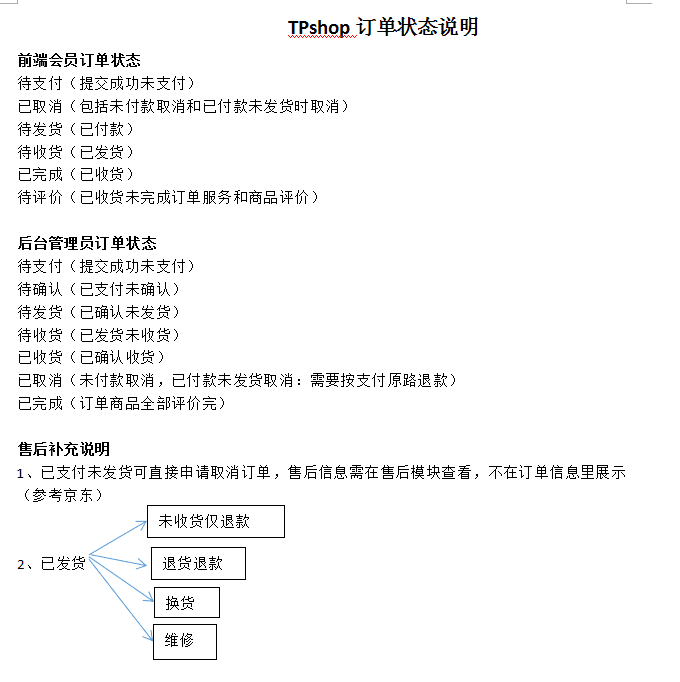
TPshop的订单状态
1 2 3 4 5 6 7 8 9 10 11 12 13 14 15 16 17 18 19 20 21 22 23 24 25 26 27 28 29 30 31 32 33 34 35 36 37 38 39 40 41 42 43 44 45 46 47 48 49 50 51 52 53 54 55 56 57 58 59 60 61 62 | /** ORDER_STATUS => array( 0 => 待确认, 1 => 已确认, 2 => 已收货, 3 => 已取消, 4 => 已完成,//评价完 5 => 已作废, ), SHIPPING_STATUS => array( 0 => 未发货, 1 => 已发货, 2 => 部分发货 ), PAY_STATUS => array( 0 => 未支付, 1 => 已支付, ), SEX => array( 0 => 保密, 1 => 男, 2 => 女 ), COUPON_TYPE => array( 0 => 面额模板, 1 => 按用户发放, 2 => 注册发放, 3 => 邀请发放, 4 => 线下发放 ), PROM_TYPE => array( 0 => 默认, 1 => 抢购, 2 => 团购, 3 => 优惠 ), // 订单用户端显示状态 WAITPAY=> AND pay_status = 0 AND order_status = 0 AND pay_code !="cod" , //订单查询状态 待支付 WAITSEND=> AND (pay_status=1 or pay_code="cod") AND shipping_status !=1 AND order_status in(0,1) , //订单查询状态 待发货 WAITRECEIVE=> AND shipping_status=1 AND order_status = 1 , //订单查询状态 待收货 WAITCCOMMENT=> AND order_status=2 , // 待评价 确认收货 //FINISHED=> AND order_status=1 , //订单查询状态 已完成 FINISH=> AND order_status = 4 , // 已完成 CANCEL=> AND order_status = 3 , // 已取消 ORDER_STATUS_DESC => array( WAITPAY => 待支付, WAITSEND=>待发货, WAITRECEIVE=>待收货, WAITCCOMMENT=> 待评价, CANCEL=> 已取消, FINISH=> 已完成, // ), /** * 订单用户端显示按钮 去支付 AND pay_status=0 AND order_status=0 AND pay_code ! ="cod" 取消按钮 AND pay_status=0 AND shipping_status=0 AND order_status=0 确认收货 AND shipping_status=1 AND order_status=0 评价 AND order_status=1 查看物流 if(!empty(物流单号)) 退货按钮(联系客服) 所有退换货操作, 都需要人工介入 不支持在线退换货 */ |